
Single-Entry vs Double-Entry Bookkeeping: Which Do You Need?
Start free trialIf you've ever opened a spreadsheet to track your money and wondered whether you're doing it "the right way," you've probably run into these two terms. Single-entry and double-entry bookkeeping are the two basic ways to record financial transactions, and most people (freelancers, small business owners, and anyone just trying to keep track of personal spending) only need to understand the difference once to know which one fits them.
This article is a plain-English explanation of both methods, with the same example worked out each way, so you can see exactly what changes and decide for yourself.
Single-entry bookkeeping: a running list
Single-entry bookkeeping is the simplest form of record-keeping. Every transaction gets one line: money in, or money out. It's essentially a checkbook register or a running list in a spreadsheet, and the running balance tells you how much cash you have.
Here's a small example. Say a freelance designer starts the month with $1,000 in their business account, then has these transactions:
| Date | Description | Money in | Money out | Balance |
|---|---|---|---|---|
| Oct 1 | Opening balance | $1,000 | ||
| Oct 3 | Payment from Client A (logo project) | $600 | $1,600 | |
| Oct 10 | Design software subscription | $40 | $1,560 | |
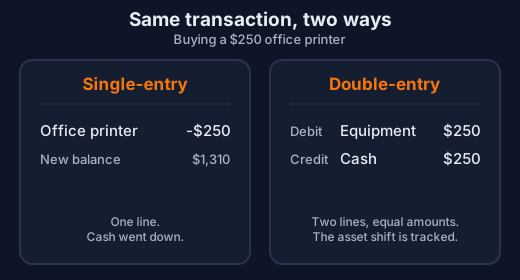
| Oct 18 | Office printer | $250 | $1,310 | |
| Oct 25 | Payment from Client B (website project) | $900 | $2,210 |
That's the whole system: a date, a description, an amount, and a running balance. There's no separate tracking of what the printer is "worth" as equipment, no distinction between revenue and a loan coming in. It's all just cash moving in or out.
Double-entry bookkeeping: every transaction, twice
Double-entry bookkeeping records the same transaction from two angles at once: where the money came from, and where it went. Every entry has a debit and a matching credit of the same amount, split across accounts like Cash, Revenue, Expenses, Equipment, and Equity. Because every transaction is recorded twice, the books have to balance: if they don't, you know immediately that something was entered wrong.
Here are the same five transactions, recorded double-entry style:
| Date | Description | Debit | Credit |
|---|---|---|---|
| Oct 1 | Opening balance | Cash $1,000 | Owner's Equity $1,000 |
| Oct 3 | Client A payment | Cash $600 | Service Revenue $600 |
| Oct 10 | Software subscription | Software Expense $40 | Cash $40 |
| Oct 18 | Office printer | Equipment $250 | Cash $250 |
| Oct 25 | Client B payment | Cash $900 | Service Revenue $900 |
Add it up by account and you get: Cash $2,210, Equipment $250, Service Revenue $1,500, Software Expense $40, Owner's Equity $1,000. Notice the Cash balance ($2,210) matches the single-entry running balance exactly. Same transactions, same cash position, more detail.
The extra detail is the point. Double-entry also tells you that the business now owns $250 of equipment, earned $1,500 in revenue against $40 in expenses, and that total assets ($2,210 cash + $250 equipment = $2,460) equal total equity ($1,000 starting capital + $1,460 net income = $2,460). That last check (assets always equal liabilities plus equity) is the thing single-entry simply doesn't give you.
The debit/credit labels follow one consistent rule, even though it feels backwards at first: debits increase assets (like Cash and Equipment) and expenses, while credits increase liabilities, equity, and revenue. A debit to Cash and a credit to Revenue, in the example above, both mean "this went up," just on opposite sides of the accounting equation. You don't have to memorize this to understand the idea; bookkeeping software applies the rule for you.
It's worth knowing the rule exists, because it's the reason double-entry catches one specific, common kind of mistake automatically: if a transaction doesn't have equal debits and credits, you know immediately that something was entered wrong. It's not a complete safety net, though. It won't catch a payment posted to the wrong account, a mistake applied equally on both sides, or a transaction that was never recorded at all. An unbalanced entry always gets flagged; a wrong-but-balanced one won't be.
Pros and cons
Single-entry:
- Fast to learn and fast to use: no accounts, no debits and credits.
- Enough to answer "how much cash do I have" and "what did I spend money on."
- Works fine in a basic spreadsheet, no software required.
- No built-in way to catch a mistake: a wrong number just sits there unless you notice it.
- Doesn't track what you own (assets) or owe (liabilities) separately from cash.
- Can't produce a real balance sheet, and accountants, lenders, and investors often ask for one.
- Gets harder to manage as soon as there's inventory, equipment, loans, or more than one person touching the books.
Double-entry:
- Catches one specific, common error automatically: if debits and credits don't match, you know something's wrong right away (it won't catch everything, see above).
- Produces a full picture: an income statement (profit and loss) and a balance sheet (assets, liabilities, and equity).
- A method accountants, auditors, lenders, and investors commonly expect.
- Scales to real complexity: multiple accounts, inventory, fixed assets, loans, multiple currencies.
- More to learn up front, and more setup (a chart of accounts) before you record your first transaction.
- Slower for very simple situations where you genuinely just want to know your bank balance.
Which one do you actually need?
For personal budgeting (tracking your own spending, saving for something, figuring out where your paycheck goes), single-entry is almost always enough. You don't need a balance sheet for your own life; you need to know what came in, what went out, and what's left.
For a freelancer or sole proprietor with simple income and expenses (no inventory, no loans, no equipment to depreciate, no employees), single-entry can genuinely work, especially in the first year or two. A lot of people in this situation track everything in a spreadsheet and that's a reasonable choice.
Double-entry is the better fit once any of these are true:
- You're running a registered business that will need a balance sheet, whether for yourself, a bank, or investors.
- You have inventory, equipment, or loans you need to track as assets or liabilities, not just cash movements.
- You work with an accountant, or expect to need one for taxes, a loan application, or an audit. Accountants work in double-entry by default, and reconciling a single-entry spreadsheet into their system later is extra work for everyone.
- Your finances are growing in complexity: more accounts, more transactions, more people involved. It's much easier to start double-entry than to switch later and have to reconstruct history.
That last point is worth sitting with for a moment. Switching from single-entry to double-entry isn't just flipping a setting: someone has to go back through every past transaction and figure out which accounts it touches, then re-enter it as a proper journal entry so the opening balances are correct. If you've been single-entry for two years and then need a balance sheet for a loan application, that catch-up work falls on you (or whoever you pay to do it) all at once, under a deadline. Starting double-entry a little earlier than you think you need it is usually cheaper than switching later.
If you're genuinely unsure which camp you're in, a useful rule of thumb: if you'll ever need to answer "what is this business actually worth" (not just "how much cash is in the account"), you need double-entry.
How Caltash fits in
Caltash supports both approaches directly, rather than forcing one on everyone. Personal mode is a simple account-and-transaction tracker that works like the single-entry example above: good for personal budgets and very straightforward freelance bookkeeping. Business mode is full double-entry, with a chart of accounts, journal entries, and real financial reports, for anyone who needs the fuller picture. Signing up starts a 14-day trial of the full version of whichever mode you pick, no card required; after that, personal mode keeps working on a free plan with modest limits, while adding new journal entries and accounts in business mode needs a paid plan. If your needs change later, you can create a new workspace in the other mode; it starts empty, since past entries aren't converted automatically.
This article is general information, not legal, tax, or accounting advice. Talk to a qualified accountant for guidance specific to your situation and jurisdiction.
Start free trial