
How to Do a Monthly Bank Reconciliation, Step by Step
 Start free trial
Your bank statement says one number. Your books say another. Most months the gap has a perfectly ordinary explanation, and a bank reconciliation is how you find it. It takes a little time once a month, and it's one of the most useful habits you can build if you keep your own books.
This article explains what a reconciliation is, walks through a monthly routine, covers the usual reasons the two balances differ (and how to fix each one), and works through an example with round numbers.
What a bank reconciliation is
A bank reconciliation compares two records of the same account: the bank's (your statement) and yours (your books, whether that's a spreadsheet or accounting software). You go through them line by line, explain every difference, and correct whatever is wrong on your side. When you're done, both balances should agree once the explained differences are accounted for.
It's not about proving the bank wrong. Banks do make mistakes, but rarely. Almost every difference is something your books haven't caught up with yet, or something the bank hasn't processed yet.
Why it matters
- It catches mistakes while they're small. A payment typed in as $540 instead of $450 is easy to fix this month. Found a year later, it's a puzzle.
- It catches things you didn't know happened. Bank fees, a card payment you forgot to record, a customer payment that never arrived, or a charge you don't recognise.
- Your reports are only as good as your books. Profit, cash on hand and tax figures all come from the same entries. If the cash account is wrong, so is everything built on it.
- It makes year end easier. Twelve small monthly reconciliations are far less work than one big one in a hurry, and an accountant will usually ask whether your accounts are reconciled.
What you need before you start
- The bank statement for the month, with its opening and closing balance.
- Your books for the same account and the same month.
- Last month's reconciliation, if you did one. Any items that were still outstanding then (a payment that hadn't cleared, for example) should appear on this month's statement.
A monthly routine, step by step
- Pick a fixed day. A few days after the statement arrives works well, so most of last month's payments have cleared.
- Check the starting point. The statement's opening balance should match the closing balance from last month's reconciliation. If it doesn't, sort that out first, or every number after it will be off.
- Match the money coming in. Go down the deposits on the statement and tick each one that's also in your books, with the same amount.
- Match the money going out. Do the same for payments, card transactions, transfers and direct debits.
- List what's left on the statement. These are things the bank recorded that your books don't have yet: fees, interest, an automatic payment you forgot.
- List what's left in your books. These are things you recorded that the bank hasn't processed yet: a deposit made on the last day of the month, or a payment that hasn't cleared.
- Fix your books. Add the genuine missing items from step 5 and correct any mistakes. Don't touch the items from step 6 if they're real; they'll clear next month.
- Compare the adjusted balances. Take the bank's closing balance, add deposits in transit and subtract uncleared payments. Take your book balance after the fixes in step 7. The two should now be the same.
- Keep a record. Note the date, both balances and any items still outstanding, so next month starts from a known point.
Why the balances differ, and how to fix each one
Deposits in transit
You recorded a deposit, but the bank hadn't added it by the statement date. This is common at month end: you pay in a cheque on the 31st and the bank shows it on the 2nd.
How to fix it: nothing to fix in your books. Add it to the bank balance in your reconciliation, and check it appears on next month's statement. If it still hasn't arrived after a few days, find out why.
Payments that haven't cleared
The opposite case: you recorded a payment, but it hadn't left the account by the statement date. A cheque the supplier hasn't banked yet, or a transfer that was still processing.
How to fix it: again, nothing to change in your books. Subtract it from the bank balance in your reconciliation and look for it next month. A cheque that stays uncleared for months is worth following up, since the person you paid may never have received it.
Bank fees and charges
Monthly account fees, card processing fees, charges for international payments. The bank takes them directly, so you often only find out from the statement.
How to fix it: add each fee to your books as an expense, dated as on the statement.
Interest
Interest the bank paid you (or charged you, on an overdraft or loan) appears on the statement before you know the exact amount.
How to fix it: add it to your books, as income for interest earned or an expense for interest charged.
Duplicates
The same payment entered twice. This often happens when you record something by hand and then also import it from a bank file, or when two people both enter the same receipt.
How to fix it: delete or reverse the extra entry in your books. If the duplicate is on the bank's side (you were genuinely charged twice), contact the bank or the supplier for a refund, and record the refund when it arrives.
Errors
The amount is wrong, the date is wrong, money in was entered as money out, or it was posted to the wrong account. A transaction may also be missing from your books entirely.
How to fix it: correct the entry so it matches what actually happened. If a transaction is missing, add it. If the bank made the mistake, ask them to correct it and keep a note until they do.
A worked example
Say it's the end of October. Your bank statement shows a closing balance of $4,200. Your books show $3,810 for the same account. That's a difference of $390.
Going through both records line by line, you find five things:
| Item | What happened | Where it goes |
|---|---|---|
| Deposit in transit | A $600 customer payment, paid in on October 31, shows on the bank's November statement | Add $600 to the bank balance |
| Uncleared payment | A $900 cheque to a supplier, written October 29, not yet banked | Subtract $900 from the bank balance |
| Bank fee | A $20 monthly account fee, not in your books | Subtract $20 from your books |
| Interest | $10 interest earned, not in your books | Add $10 to your books |
| Duplicate | A $100 software subscription entered twice | Add $100 back to your books by removing the duplicate |
Now adjust each side. The bank side takes the timing items; the book side takes the fixes:
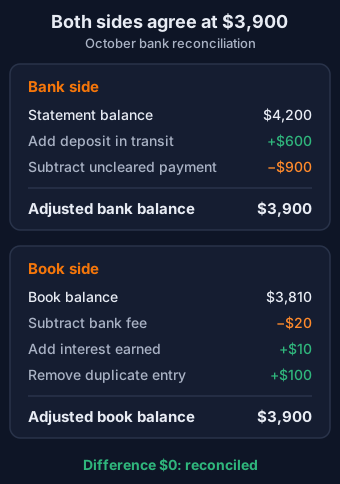
Both sides now say $3,900, so the account is reconciled. Notice that only the book-side items needed an entry in your books. The bank-side items are timing differences: next month, the $600 deposit and the $900 cheque should both show on the statement, and they'll match then.
How often to reconcile
Once a month, when the statement arrives, suits most small businesses and freelancers. If you have a lot of transactions, or cash is tight and you need to know exactly where you stand, doing it weekly keeps each session short. Either way, reconcile every account the business uses, including savings accounts and business credit cards, not just the main current account.
What to do if it won't balance
Sometimes you've been through everything and there's still a difference. Some checks that usually find it:
- Check the opening balance again. If last month's reconciliation was off, this month will be too. Go back to the last month that did balance.
- Check the date range. Make sure your books and the statement cover exactly the same dates.
- Look for the exact amount. If the difference is $85, search both records for $85. A single missing or extra item is the most common cause.
- Halve it. If the difference is $170, look for an $85 item entered the wrong way round: money in recorded as money out shifts the balance by twice the amount.
- Try dividing by 9. If the difference divides evenly by 9 (say, $54 − $45 = $9, or $540 − $450 = $90), you may have swapped two digits somewhere.
- Take a break. Seriously. A fresh look the next day often spots what an hour of staring didn't.
If it still won't balance after all that, ask your accountant or bookkeeper. Leaving an unexplained difference and hoping it goes away usually makes the next month harder.
Reconciling in Caltash
If you keep your books in Caltash, open Reconcile from the sidebar and choose the account. Upload your bank statement as a CSV file with Date, Description, Credit and Debit columns (there's a sample file you can download to see the layout), type in the statement's closing balance, and press Preview matches. The first time you reconcile an account, enter the statement's opening balance too; after that it's optional, and if you enter it, it has to match the closing balance of your last reconciliation.
Caltash pairs each statement line with an entry in your books for the same amount, in the same direction, dated up to three days either side, so a payment you recorded on the 29th that the bank processed on the 2nd still matches. It prefers an entry on the exact date, then the closest date, and never uses a statement line or an entry twice. The preview then lists:
- the statement lines it couldn't find in your books;
- the lines it matched on a different date, with the date in your books;
- the entries in your books that aren't on the statement yet, such as a cheque that hasn't been banked.
Tick the statement lines that really are missing from your books, such as a bank fee or interest, and choose Create selected rows to add them as entries. In business mode they go on Uncategorized for now, ready for you to choose the right account. If an entry is more than three days away from its statement line, like a cheque written in September and banked in late October, pick it from Pair with an entry in your books next to that line. Caltash only offers entries for the same amount, in the same direction, dated on or before the line, and shows the pair as paired by hand, with Unpair if you picked the wrong one.
Below the lists is the reconciliation itself, laid out like the worked example above. The Bank side starts from the statement's closing balance, adds uncleared deposits and subtracts uncleared payments to give the adjusted bank balance. The Book side shows your book balance on the statement's last day, and the difference between the two. In the example, once the fee and the interest are in and the duplicate subscription is deleted, the bank side reads $4,200 + $600 − $900 = $3,900, the book side reads $3,900, and the difference is $0.00. A duplicate shows up in the list of entries not on the statement, just like a payment that hasn't cleared, so check each entry in that list is real before you go on.
The Mark reconciled button for the month (for example, Mark October 2026 reconciled) only becomes available when every statement line is matched and the two sides agree to the cent. If something doesn't add up, Caltash says what: a missing line, a closing balance that doesn't match your books, or an opening balance that doesn't follow on from your last reconciliation. Each account is reconciled one calendar month at a time, in order.
Marking the month reconciled clears every entry matched on that statement. A cleared entry never matches again, so a line repeated on next month's statement can't match it a second time, and its date, amount and bank account are fixed (you can still change its description and category, or in business mode its account). Entries that weren't on the statement aren't cleared: they're carried forward and listed again next month until a statement shows them. The first time you reconcile an account, entries dated before that statement count as already cleared.
If a reconciliation needs redoing, an admin can reverse it from the list of completed periods. Only the account's latest reconciliation can be reversed, and only while its month is still open. Reversing it marks its entries as uncleared again, so they can be matched again, and both the reconciliation and its reversal are recorded with who did them.
In business mode, a month can only be closed from Close period when every bank account with entries in that month has been reconciled for it (an account with no entries that month doesn't need one), along with the rest of the checklist, such as every entry being approved and having an account. Business mode also checks that each bank account's balance in your ledger agrees with the balance of its entries before it lets you mark the month reconciled.
Reconcile is included in Personal Plus and both business plans, and in the 14-day trial. If you'd like to see a finished one first, the free demo is a small design studio's business books with three months of sample entries, and its oldest month has already been reconciled and closed. Open Reconcile and choose Studio Checking to see the completed period. No sign-up needed.
New to keeping business books? Our guide to single-entry vs double-entry bookkeeping explains the two basic methods and which one you need.
Ready to try it with your own accounts? Start a free 14-day trial, no card required.
This article is general information, not accounting or tax advice. Talk to a qualified accountant for guidance specific to your situation.
Start free trial